


5 Data Tasks You Should Automate With Python First

You’ve decided to learn Python for data automation. Tutorials make sense. Basic syntax clicks. But when you close the tutorial and open a blank file, paralysis sets in. What should you actually build? Where does theory become practice?
The gap between learning Python and applying Python stops most people. This guide bridges that gap with five specific automation projects — chosen because they’re achievable for beginners, immediately useful, and teach skills that transfer to bigger projects. For the complete learning path these projects fit into, this Python data automation guide provides full context.
Why These Five Tasks?
We selected these projects based on three criteria:
Achievable with basic skills. Each project requires only fundamental Python knowledge — variables, loops, basic file operations, and elementary pandas. No advanced concepts needed.
Immediately valuable. These aren’t toy examples. Each solves a real problem that wastes real time in real workplaces. You’ll use what you build.
Skill-building sequence. The projects progress logically. Skills from Project 1 support Project 2, and so on. Complete all five and you’ve covered core data automation patterns.
Project 1: File Organizer
The problem: Your Downloads folder (or any folder) accumulates files chaotically. Finding anything requires scrolling through hundreds of items. Manual organization takes time you never have.
What you’ll build: A script that scans a folder, identifies file types by extension, creates organized subfolders (Documents, Images, Spreadsheets, etc.), and moves files automatically.
Skills learned:
- Working with file paths using pathlib
- Listing directory contents
- Conditional logic (if/elif for file types)
- Creating folders programmatically
- Moving files with shutil
Time to build: 2-4 hours
Time saved: 15-30 minutes per organization session, plus reduced frustration finding files
Why start here: File operations are fundamental to almost all automation. This project teaches them in a satisfying, immediately useful context. Run it once and your messy folder becomes organized in seconds.
Project 2: CSV Combiner
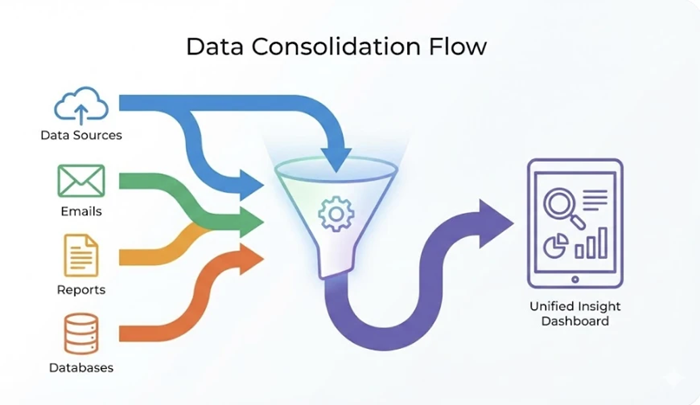
The problem: You receive data in multiple CSV files — monthly reports, regional data, exported records. Combining them into one file for analysis means tedious copy-paste or clunky Excel imports.
What you’ll build: A script that finds all CSVs in a folder, reads each into a DataFrame, combines them into a single dataset, and exports the unified result.
Skills learned:
- Introduction to pandas DataFrames
- Reading CSV files with pandas
- Concatenating DataFrames
- Writing combined data to new files
- Looping through files in a directory
Time to build: 2-3 hours
Time saved: 30 minutes to several hours per combination task, depending on file count
Why do this second: This introduces pandas — the most important library for data automation. The task is simple enough that pandas concepts stay clear, not buried in complexity.
Project 3: Data Cleaning Script
The problem: Raw data is messy. Inconsistent formats, duplicate entries, missing values, extra whitespace. Manual cleaning in Excel is tedious and error-prone, especially for recurring data.
What you’ll build: A script that loads data, applies standard cleaning operations (removing duplicates, handling blanks, standardizing formats), and outputs clean data ready for analysis.
Skills learned:
- Identifying and removing duplicates
- Handling missing data (drop vs fill)
- String operations (strip whitespace, standardize case)
- Data type conversions
- Creating reusable cleaning functions
Time to build: 3-5 hours
Time saved: Hours per dataset, with consistent quality impossible to match manually
Why do this third: Data cleaning is unavoidable in real work. Learning it early means every future project starts with clean data. The script becomes a template you’ll reuse constantly.
Project 4: Excel Report Generator
The problem: You create similar reports repeatedly — weekly summaries, monthly statistics, formatted outputs for stakeholders. Each time involves the same steps: load data, calculate, format, save.
What you’ll build: A script that reads source data, performs calculations (totals, averages, comparisons), creates a formatted Excel file with proper column widths and number formats, and saves with a date-stamped filename.
Skills learned:
- pandas aggregation (groupby, sum, mean)
- Writing to Excel with formatting using openpyxl
- Working with dates in Python
- Creating dynamic filenames
- Basic report structure design
Time to build: 4-6 hours
Time saved: 1-3 hours per report generation cycle
Why do this fourth: Report generation combines reading, processing, and writing — the complete automation cycle. The output is tangible: a professional Excel file you can share immediately.
Project 5: Simple Web Data Collector
The problem: You need data from a website — prices, listings, public information. Manual copying doesn’t scale. The data updates, requiring repeated collection.
What you’ll build: A script that fetches a webpage, extracts specific data (a table, a list of items, specific values), and saves it to a CSV for further analysis.
Skills learned:
- HTTP requests with the requests library
- Basic HTML parsing with Beautiful Soup
- Extracting data from web page structure
- Handling web data quirks
- Storing collected data systematically
Time to build: 4-8 hours (varies by website complexity)
Time saved: Unlimited — automates data collection that would be impractical manually
Why do this fifth: Web scraping extends automation beyond your local files to the entire internet. It’s also slightly more complex, making it appropriate after building foundational skills with the previous projects.
The Progression Pattern
Notice how skills build:
Project 1 teaches file operations → used in every subsequent project
Project 2 introduces pandas basics → foundation for Projects 3, 4, 5
Project 3 adds data transformation → essential for Project 4’s calculations
Project 4 combines input/processing/output → complete automation pattern
Project 5 extends to external data → broadens what’s possible
After completing all five, you’ve built a toolkit covering most common data automation scenarios. More importantly, you’ve practiced the patterns that scale to complex projects.
Making Projects Your Own
Generic tutorials teach generic skills. These projects become powerful when customized to your actual work:
File Organizer: Add rules specific to your file naming conventions. Organize by project code, client name, or date extracted from filenames.
CSV Combiner: Add validation that checks for expected columns. Include summary statistics in the output. Flag files that don’t match expected format.
Data Cleaning: Build rules for your specific data quality issues. Create a cleaning log that documents what was changed. Make it configurable for different data sources.
Report Generator: Match your actual report format exactly. Include charts if needed. Add conditional formatting highlighting important values.
Web Collector: Target websites relevant to your work. Set up scheduling to collect data daily. Build historical datasets over time.
Customization transforms learning exercises into valuable tools. The project serves your needs, and you learn more by solving real problems.
Common Obstacles and Solutions
“My data is different from examples.” Good — that’s real learning. Use examples to understand concepts, then adapt to your data’s specific structure.
“I get stuck on errors.” Error messages contain clues. Read them carefully. Copy the error into a search engine. Most problems have documented solutions.
“It works but the code is ugly.” Working ugly code beats beautiful code that doesn’t exist. Clean it up later. First make it work.
“I don’t know if I’m doing it right.” If it produces correct output, it’s right enough. Optimization comes with experience. Functionality comes first.
After the First Five

Completing these projects gives you:
- Working automations saving real time
- Confidence that you can build useful tools
- Foundation for tackling more complex projects
- Portfolio pieces demonstrating practical skills
The next level includes: API integrations, database connections, email automation, scheduled execution, and more sophisticated data transformations. But those build on exactly what these five projects teach.
Start With Project 1 Today
You don’t need to complete all five before benefiting. Project 1 alone — the file organizer — can be built in an afternoon and used immediately. Each project stands alone while contributing to cumulative skill.
Pick the project addressing your most annoying current task. That motivation carries you through the learning friction. Within days, you’ll have automation that saves time every week indefinitely.
For structured training covering all skills these projects require — with guided instruction and additional projects — the LearnForge Python Automation Course provides comprehensive curriculum from fundamentals through advanced data automation techniques.
The first project is always the hardest. The fifth is almost routine. Start with one.
Hello!! My name is Jeanine
I love to eat, travel, and eat some more! I am married to the man of my dreams and have a beautiful little girl whose smiles can brighten anyone’s day!